
Conversion Tracking
Unlock every interaction’s potential—see who’s engaging, follow their journey, and turn clicks into lasting connections. That’s how $14.4 billion in revenue gets made.
Used By Companies Like:





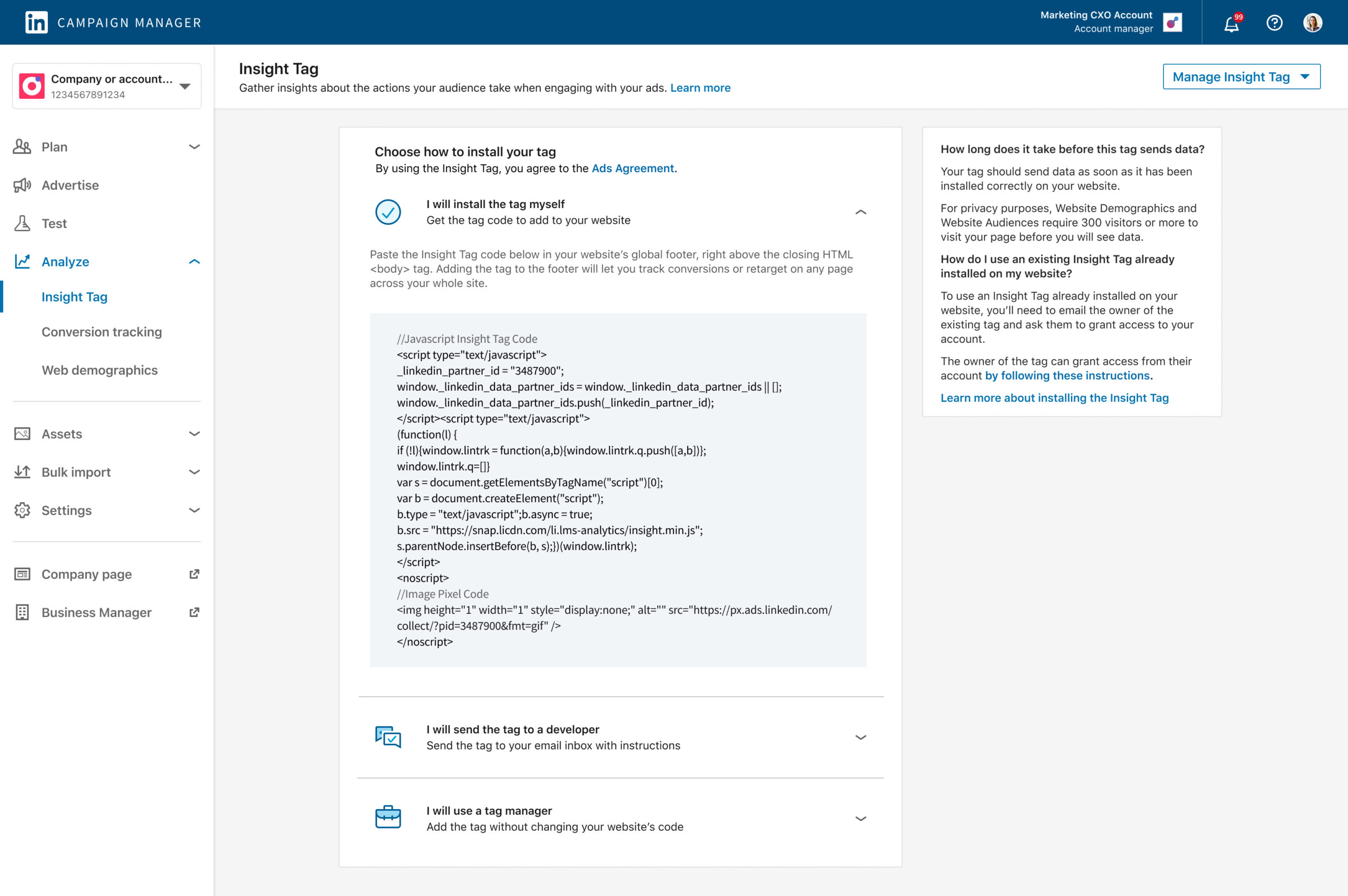
Insight Tag
Boost your ad game with LinkedIn’s Insight Tag! Say goodbye to complicated tracking codes—just copy, paste, and let it do the magic. Instantly see who’s engaging with your ads and make smarter moves effortlessly!
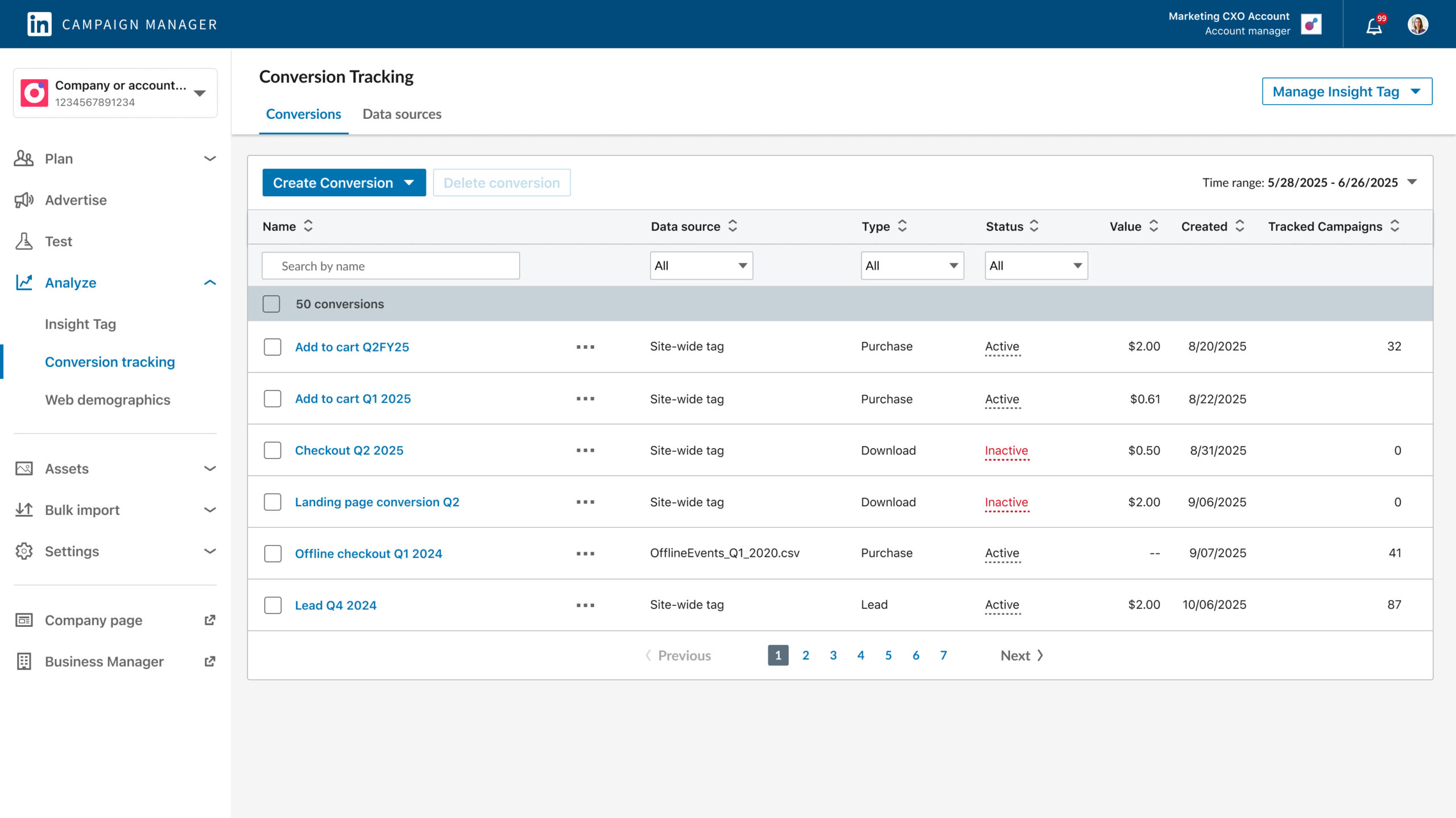
View Conversions
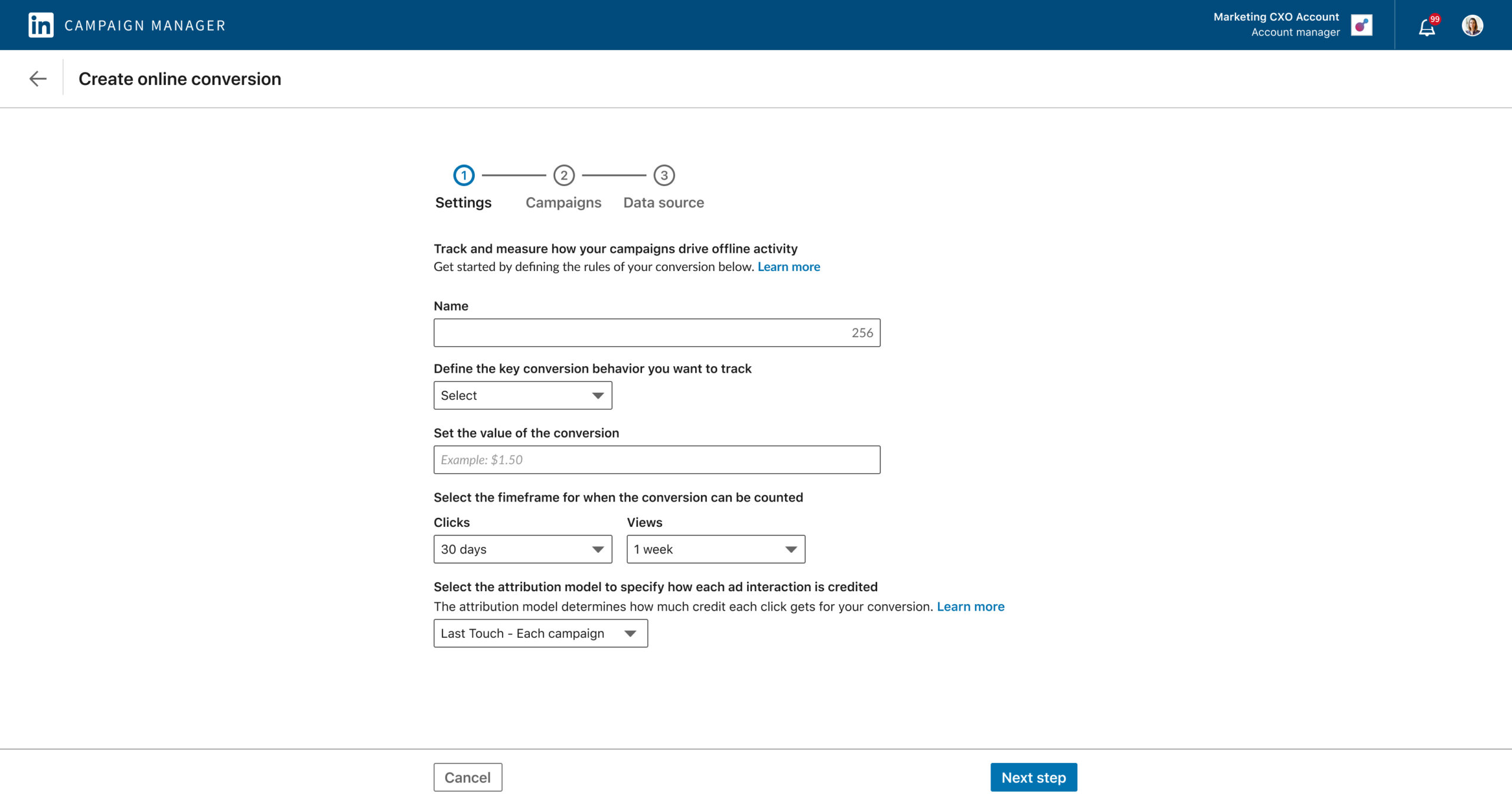
Easy Set-Up Guide
About LinkedIn
LinkedIn is a global professional networking platform that connects people and businesses, empowering users to build careers, share insights, and collaborate. A major driver of its business is LinkedIn Ads—a powerful tool for targeted advertising—supported by features like Conversion Tracking to measure and optimize campaign performance. In 2023, LinkedIn generated $14.4 billion in revenue, with advertising making up a significant share of that total.
The Background
As a Staff Product Designer at LinkedIn, I led the design and research efforts to revamp conversion tracking within LinkedIn’s Campaign Manager—the company’s second-highest revenue-generating product. Collaborating closely with product management and cross-functional teams, I aligned strategic goals to drive greater value for our customers and contributed to $14.4 billion in revenue.
My Role
Staff Product Designer, crafted strategies to align design with business goals, collaborated with product managers to ensure alignment on objectives & led user research to guide design decisions. Drove the testing and validation of designs to shape a user-centric product experience that delivered both seamless usability and business success.
Goal
Identify a decline in user engagement & take action by conducting research to uncover root causes. Present key findings to leadership & lead the redesign of the platform focusing on creating intuitive, user-friendly workflows that boost engagement & enhanced the overall user experience.
Defining Scope & Success
To kick off the project, I partnered with key stakeholders to outline the project objectives & agree on what success would mean. We identified clear goals and success metrics to track progress after launch. This alignment created a strong foundation that influenced my design strategy and decision-making throughout the process.
Business Success
Address a decline in user engagement within LinkedIn’s Campaign Manager conversion tracking platform. Increase engagement by 18%, resulting in approximately 2.6 billion in revenue.
Design Success
Analyze friction points in the current platform and create a redesigned user experience to increase user engagement by 18% through enhanced UX improvements.
Design Strategy & Research Plan
To start my design initiative, I tracked user behavior on LinkedIn’s Conversion Tracking, analyzing how users entered the platform, how long they stayed on each page, and where they dropped off. I then scheduled meetings with users to understand their pain points, identify areas within Conversion Tracking causing issues, and learn what they liked and disliked about the platform. This helped me design a new user flow focused on both user and business needs. Below are some of the research and design methods I used to shape my approach.
Research Methods
Behavior Tracking
User Analytics
User Path Analysis
User Interviews
Design Methods
Wireframes
High-fidelity Design Mocks
Interactive Prototypes
Prototype Testing & Feedback
Who We’re Designing For
LinkedIn’s Conversion Tracking tool is used by marketers, social media managers, B2B sales teams, agencies, small business owners, and content strategists to measure and optimize campaign performance. It helps users track key actions such as form submissions, website visits, and product purchases, providing valuable insights into how ads drive conversions. By using Conversion Tracking, users can refine their strategies, target the right audience, and improve ROI on their LinkedIn advertising efforts.
What’s A Marketer?
A marketer is a professional responsible for promoting a company’s products, services, or brand through various strategies, including digital advertising. Marketers use tools like LinkedIn’s Conversion Tracking to measure the effectiveness of their campaigns, track conversions, and refine their strategies to improve engagement and drive business outcomes. They focus on understanding customer behavior, creating targeted content, and optimizing campaigns to achieve specific goals such as lead generation, sales, or brand awareness.
An Marketer’s Journey
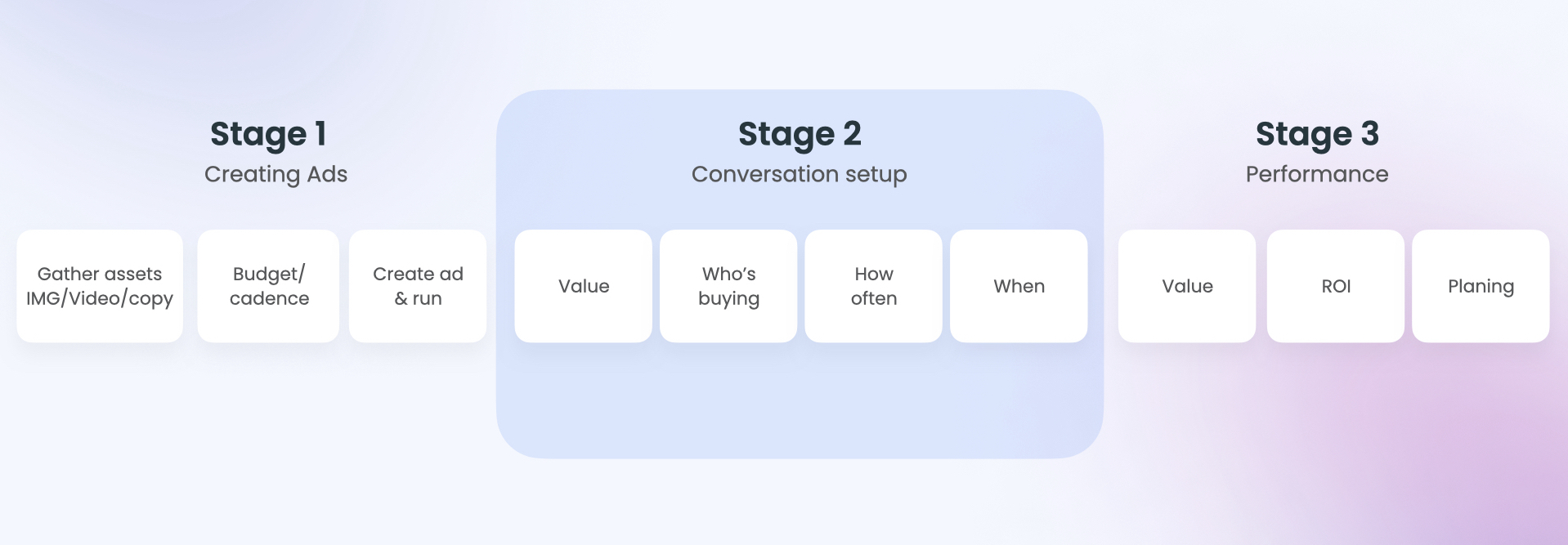
A marketer’s journey with LinkedIn’s Conversion Tracking begins by setting up an ad campaign in Campaign Manager, where they define the target audience, budget, and campaign objectives. Once the campaign is live, they focus on Conversion Tracking to track key actions like website visits, form submissions, and purchases. This tool helps marketers identify which ads are driving results, optimize their strategies, and measure ROI. Conversion Tracking is essential because it directly connects ad spend to outcomes, enabling data-driven decisions and continuous campaign improvement. However, user interviews revealed that the biggest challenge is the initial setup, where users often struggle with configuring the Insight Tag and understanding basic online advertising principles.
Click to see full screen
Pain Points Discovered
The user journey revealed that marketers often struggle with the initial setup process, spending significant time trying to configure their online conversions. The lack of clear guidance—especially around setting up conversions—leads to frustration and makes it difficult to assess campaign performance, contributing to user churn within LinkedIn’s Conversion Tracking. Marketers also face challenges throughout the analysis journey, such as difficulty locating and implementing tracking codes, which are crucial for capturing online behavior linked to digital advertising. Below are some key pain points identified during the user’s journey.
Guidance
No guidance on how to configure conversions.
Support
Lack of access to help articles when users need help.
Tacking Code
Difficulty finding and implementing the ad tracking code.
Usability
Platform is difficult to use and navigate through.
Confirmation
Uncertainty if the conversion is set up correctly.
Opportunities
By analyzing user research, I identified several key opportunities to improve the conversion creation process. These insights, outlined below, stemmed from a deep understanding of user behaviors and pain points. The research highlighted the need for a clear, guided user experience that would reduce confusion during conversion setup and provide easy access to help center links for addressing any questions about conversions or online advertising. The goal is to empower marketers to better understand and assess the performance of LinkedIn’s Conversion Tracking, enabling users to continue using the platform and optimize their ad campaigns to achieve their objectives. Below are the primary opportunities that will guide the design of this enhanced user experience:
Step-By-Step UX
Support users through the set-up process.
Guidance & Support
Empower the right decisions through help articles.
Access to Tracking Code
Provide a simple and easy way to access the tracking code.
Fast Set-Up
Simple and painless way to create a conversion.
Defining The Problem & A Path Forward
LinkedIn’s Conversion Tracking system encountered significant challenges that hindered its effectiveness for marketers. Recognizing the need to address these obstacles, I focused on simplifying the setup process to empower marketers to easily track conversions and demonstrate clear ROI. To ensure we tackled the most critical issues, I began by defining a Problem Statement that highlighted the root cause of the pain points. From there, I reframed the challenge with a ‘How Might We’ Statement, transforming it into an opportunity for improvement. This framework not only guided my design decisions but also helped the product team stay aligned on a clear strategy, driving us towards a more intuitive and valuable user experience.
The Problem
Users don’t see the value of LinkedIn ads because they find setting up Conversion Tracking too difficult, which results in fewer ads being created through LinkedIn’s Campaign Manager.
How Might We
Make the conversion tracking setup fast and easy, guiding users through each step so they can see the value of LinkedIn Ads and continue creating more ads with Campaign Manager.
The Design Phase
The design phase was driven by a clear user challenge: marketers encountered difficulties when setting up conversions on LinkedIn. To address this, I prioritized creating a streamlined and guided experience that simplified the setup process. The goal was to minimize friction, provide clarity at every step, and enable users to track conversions effectively within the platform. The design process began with developing low-fidelity wireframes, which allowed for the exploration and validation of initial concepts based on user feedback. This iterative approach helped shape the overall design direction before advancing to high-fidelity designs, all while adhering to LinkedIn’s established design system. Interactive prototypes were then created to test the design in a real-world context, offering users a hands-on experience with key flows and interactions. This method allowed for the assessment of both primary and subtle interactions, ensuring that the design was intuitive and met user needs. It also provided crucial feedback that informed continuous refinement, ensuring the final design was aligned with usability standards and user objectives.
Wireframe 1
In my initial wireframe, I explored simplifying the overall page structure by consolidating the conversion setup into a single view. The goal was to assess how much guidance users require during setup and to identify the key components needed at each step. By placing the entire process on one page, users could clearly see all necessary elements to complete the conversion. However, user testing revealed that additional guidance was still needed—some users skipped critical steps, resulting in setup errors. This feedback has been valuable in shaping the direction of my next set of wireframes, outlined below.
Click to see full screen
Wireframe 2
Based on feedback from previous user sessions, this set of wireframes emphasizes guided setup by breaking the process into clear, sequential steps. Each section allows users to focus on a specific part of the experience, ensuring key actions are completed before moving forward. During testing, users responded positively to this approach, noting its clarity and efficiency in completing a conversion. My next exploration will shift focus to the implementation of tracking code, which is essential for capturing online behaviors such as ad interactions and button clicks.
Click to see full screen
Auto Tag Install
Some of our users incorporate tag managers into their workflow to manage and deploy marketing tags that track ad interactions. This design direction supports those users by making it easy to install LinkedIn’s tracking tag through their preferred platform. With a single click, they can connect to tools like Google Tag Manager to send and install the necessary backend data—allowing them to run, modify, and track the code effortlessly. User testing showed strong positive feedback, and this direction is now in development at LinkedIn. While it requires more engineering work, we’ve also created a simplified interim solution to provide immediate value to users.
Click to see full screen
Final Results
The final design provides a simple, step-by-step process for setting up conversions. It breaks the setup into three clear sections, with helpful information along the way. “Learn More” links offer detailed resources on online advertising and LinkedIn’s conversion tools. Once a conversion is complete, users get a confirmation that their campaign is live. This easy-to-use design helps LinkedIn’s 830 million members create effective campaigns and gain valuable insights into ad performance, improving on the previous platform.
Click to see full screen
Success Metric
Following the launch of the new experience, the Design and Product teams closely monitored user engagement. The updated platform delivered better results than the previous conversion platform across multiple key metrics. By prioritizing a user-friendly design, intuitive guidance, and easier tracking code discovery, we achieved notable improvements in user satisfaction, retention, and a significant increase in the number of users actively engaging with LinkedIn’s Campaign Manager.
Increased Engagement Rate
43
Increased Completion Rate
69
Increased Tag Discovery
73
Want to learn more
about this case study
or others projects?
For details on my design process or collaboration opportunities, feel free to get in touch!